An Introduction to LoRaWAN and AWS IoT Core: How I Monitor My Home Energy Consumption

I recently had the pleasure of presenting my home monitoring project on two French-speaking podcasts: the AWS Podcast en français, episode 374 hosted by Sébastien Stormacq, and Les Technos. Both episodes go deep into how I monitor my water, gas and electricity consumption with sensors I partly built myself. This article is an opportunity to share the same story with English speakers, and to give AWS enthusiasts a practical introduction to LoRaWAN and AWS IoT Core for LoRaWAN.
By the end of this article, you will know:
- what LoRaWAN is and how a LoRaWAN network is structured,
- why it is a great fit for battery-powered sensors that must communicate over long distances,
- what AWS IoT Core for LoRaWAN brings as a fully managed LoRa Network Server,
- how I assembled all of this into a home energy monitoring platform that costs almost nothing to run.
What is LoRaWAN?
LoRaWAN is a wireless communication protocol designed for the industrial IoT. It is built on two layers:
- LoRa is the physical layer: the radio modulation that defines how bits are turned into radio waves. The technology originated in France and is now owned by Semtech, which remains essentially the only supplier of LoRa chipsets.
- LoRaWAN is the MAC layer on top of LoRa. It orchestrates how and when devices transmit to avoid collisions, and it adds authentication, encryption and message deduplication.
The anatomy of a LoRaWAN network
A LoRaWAN network has three main components:
- Devices: the sensors. Each one embeds a LoRa chipset with a unique identifier called the DevEUI, comparable to the MAC address of an Ethernet card.
- Gateways: small boxes that look like Wi-Fi routers, except the antennas listen to LoRa frequencies. A gateway forwards every message it hears to a LoRa Network Server over Ethernet, Wi-Fi or a cellular backhaul.
- The LoRa Network Server (LNS): the brain of the network. It authenticates devices, deduplicates messages and schedules downlink communications.
An important design choice: a device does not pair with a specific gateway. When a sensor transmits, every gateway in range receives the message and forwards it to the LNS. The LNS then says “I received this message five times, here it is once, with the list of gateways that heard it and the signal quality for each”. More gateways means better coverage and better battery life, without any configuration on the device.
Range: from your basement to a satellite
Range is the headline feature of LoRa. Indoors, a signal crosses walls and concrete floors and covers several hundred meters. This is what makes it possible to read an electricity meter located three floors below your apartment, or a gas meter placed in a box across the street.
Outdoors, with an antenna on a rooftop, 5 to 10 kilometers is common, and dedicated antennas reach tens of kilometers. On the ground, the practical limit is the curvature of the Earth: after a few tens of kilometers the signal passes above the horizon. LoRa even works with satellites, and enthusiasts once bounced a signal off the Moon with a device running on a watch battery: extreme range for a tiny amount of energy.
Device classes
LoRaWAN defines three device classes that trade latency against battery life:
- Class A: battery powered. The device sleeps, wakes up to transmit, then listens during a short window in case the server has something to say. If you want to send a command to a class A device, the LNS queues it and delivers it right after the next uplink.
- Class B: battery powered, with synchronized listening windows. All devices of a fleet wake up at the same moment, which allows broadcasting a command to thousands of water meters at once. In practice it is rarely used.
- Class C: mains powered. The radio listens continuously and the server can talk to the device at any time.
The constraints: tiny messages, sparse transmission
LoRaWAN is not Wi-Fi. Payloads are small, from a few bytes to around two hundred bytes depending on the data rate, and duty-cycle regulations on the license-free bands limit how often you can transmit. In my setup, a sensor sends a message every 15 minutes at most, with a payload around one hundred bytes.
The protocol also implements an adaptive data rate. A device close to a gateway transmits fast, spends less time on air and saves battery. A device far away lowers its data rate to increase range, at the cost of longer transmissions and higher consumption. All of this is negotiated automatically by the protocol.
These constraints force a healthy discipline: you aggregate on the device and you encode payloads in compact binary formats. This forces you to be frugal and helps you stay in the AWS Free Tier.
Security built in
Security is one of the reasons I chose LoRaWAN over consumer protocols. Each device is provisioned with cryptographic keys, and two activation modes exist:
- Over-The-Air Activation (OTAA): the device and the LNS share a root key. At join time, they perform a cryptographic exchange and derive two session keys. The application session key encrypts the payload end to end, so the content is only readable by your application. The network session key protects and authenticates the traffic at the network level. Session keys can be renewed periodically.
- Activation By Personalization (ABP): the session keys are written into the device once and never change. This is rarely used for commercial devices due to some limitations. It offers a bigger attack surface, as the keys never rotate, and it limits the lifetime of the device: each packet includes a frame counter, incremented at each transmission, used to deduplicate messages and to reject replayed ones. The counter is a 16-bit register, so after 65,536 transmissions, about 7 years for a device that transmits every hour, the sensor cannot communicate with the LNS anymore, unless you delete and recreate the device in the LNS. This applies to LoRaWAN specifications up to 1.0.3, see the note at the end of this article.
On top of that, the gateway itself authenticates to the LNS with certificates over TLS, and industrial deployments can go through AWS PrivateLink to avoid the public internet entirely.
There is also a structural security argument. A LoRaWAN sensor is a heavily constrained device that can only emit a few messages per hour. Even if compromised, it cannot join a botnet or exfiltrate data at any useful rate. Compare that with a cheap Wi-Fi connected TV box, which ships with enough connectivity and computing power to participate in denial of service attacks, and sometimes ships with malware preinstalled.
Finally, in some countries (not in Belgium where I live), AWS provides AWS IoT Core for LoRaWAN as a public network. This can replace the gateway or provide a backup network in case of internet connectivity issues, as a device can join both networks.
Why LoRaWAN instead of Zigbee, Matter or Wi-Fi?
If you do home automation, you probably think Zigbee, Matter or Wi-Fi first. Here is the honest comparison.
LoRaWAN wins on:
- Range: hundreds of meters indoors, kilometers outdoors. Zigbee and Wi-Fi do not leave the house.
- Battery life: years on a battery. My CO2 sensor is designed for 5 years on a replaceable battery. Some temperature sensors integrate a small solar panel and never need maintenance at all. In industry this matters a lot: sending a technician to replace a battery every three years costs more than the sensor itself.
- Security: encryption and key rotation by design, and devices too constrained to be abused.
- Scale: one gateway serves hundreds of devices from different vendors, and the protocol is an open standard driven by the LoRa Alliance.
LoRaWAN loses on:
- Price: equipment costs more, partly because a single company supplies the radio chipsets, so there is less competition.
- Consumer friendliness: this is an industrial protocol. There is no polished smartphone app to onboard a device in two taps. Integration requires more work, although gateways generally expose messages over MQTT, which Home Assistant consumes happily. Discussions are ongoing at the LoRa Alliance to run Matter on top of LoRaWAN, which would improve interoperability with consumer ecosystems.
- Bandwidth: forget cameras, audio or frequent updates. This is for measurements, counters and events.
The typical industrial users illustrate the sweet spot: utilities doing remote water meter reading across entire countries, acoustic sensors listening for water leaks in distribution networks, and even my bakery, which monitors the temperature of the pastry display with a LoRaWAN sensor. In the UK, social housing operators equip homes with temperature, humidity, CO2 and water sensors, and in winter they shut off the water supply of unheated homes before the pipes freeze.
What does the hardware cost?
A realistic budget, based on the equipment I actually use:
| Equipment | Example | Price |
|---|---|---|
| DIY Arduino-compatible LoRaWAN board | CubeCell (used for my electricity and water meters), Arduino MKR WAN 1310 | 7 to 50 EUR |
| Door/pulse counter sensor | Dragino LDS02 (used on my gas meter) | 20 EUR |
| Temperature and humidity sensor | Dragino LHT52 | 25 EUR |
| Pressure and water level sensor | Dragino PS-LB-I5 (monitors my rainwater tank) | 150 EUR |
| CO2, temperature and humidity sensor with display | Elsys ERS CO2 Lite (in the bedroom, 5-year battery) | 220 EUR |
| Indoor gateway | Browan Femto Lite, ThinkNode G1 | around 100 EUR |
| Professional indoor gateway | Milesight UG63 | around 160-200 EUR |
| Outdoor gateway | LORIX One | 800 to 1000 EUR |
For a home setup, one 100 EUR gateway plus a few sensors is enough to get started. If you build your own sensors, add a battery for 5 or 6 EUR and a soldering iron. If you are lucky, your house is already covered by the Everynet (now NetMore) public LoRaWAN network and you do not even need a gateway. AWS provides a catalogue of gateways from partners, certified compatible with the service.
Where do you run the LoRa Network Server?
Remember, the LNS is the software brain of the network. You have several options:
- On the gateway itself: some gateways embed an LNS. Simple, but you are often limited to one gateway and sometimes to one vendor.
- Self-hosted: run an open source LNS such as ChirpStack on a server, on premises or in the cloud. Full control, full maintenance burden.
- Community networks: The Things Network and Helium let you declare your gateway as part of a shared public network, and use gateways deployed by other people around you.
- Managed public network: in some countries, telecom operators sell LoRaWAN connectivity to enterprises. AWS does this too, through a partnership with Everynet announced in 2023. Since the end of 2024, the company has been acquired by NetMore Group and all documentation links regarding coverage are now broken.
- A managed cloud service: this is AWS IoT Core for LoRaWAN.
I picked the last option, for the same reasons I would in a professional project: I do not want to patch a server, I want the keys of my devices stored durably, and I want the service to survive an availability zone failure. At my scale, it costs almost nothing (0.07 USD per month for 13 devices and 2 gateways).
AWS IoT Core for LoRaWAN in practice
AWS IoT Core is mostly known as a managed multi-protocol event bus for IoT devices. It also contains a section called LPWAN devices, and inside it, native LoRaWAN support: AWS operates the LoRa Network Server for you.
Setting it up follows the physical chain:
- Register the gateway. You create the gateway in the console, the CLI or infrastructure as code, then upload AWS-generated certificates onto the gateway and point it to your AWS LNS endpoint. The TLS connection authenticates both sides. One catch: not every gateway on the market lets you install custom certificates. I wrote two dedicated posts about the gateways I use, the Browan Femto Lite and the ThinkNode G1.
- Register the devices. For each sensor you declare the DevEUI and the OTAA keys, plus a device profile that says “this device operates on EU868 frequencies and is class A”.
- Assign a destination. Each device gets a destination, which maps its messages to an MQTT topic in IoT Core. Topics are hierarchical, for example
lora/sensors/openclose/dragino_lds02/gas. - Write IoT rules. Rules subscribe to topics and route messages to other AWS services, with a direct integration to S3, Lambda and many others. As with SNS, several consumers can listen to the same topic.
When a message arrives, IoT Core hands you a JSON document with the device identifier, the list of gateways that received the message with their signal quality, the frequency and data rate used, and the payload itself. The payload is the binary message from the sensor, base64 encoded. Decoding it is your job: every sensor model has its own compact format, described in its datasheet. This is the only real custom code in the whole chain, and to be honest, in 2026 I hand the datasheet to Claude Code, show it one of my existing decoding Lambdas, and let it generate the decoder for the new sensor. Reading data this way is low risk. Be much more careful with downlinks that reconfigure sensors: a bad configuration message can leave a device in a broken state.
Here is an example of an uplink message:
| |
My use case: water, gas and electricity monitoring
Now the fun part. My goal was to track my energy consumption with a system that would also work in an apartment, where the meters can be several floors away, and to keep the cloud bill as close to zero as possible.
The sensors
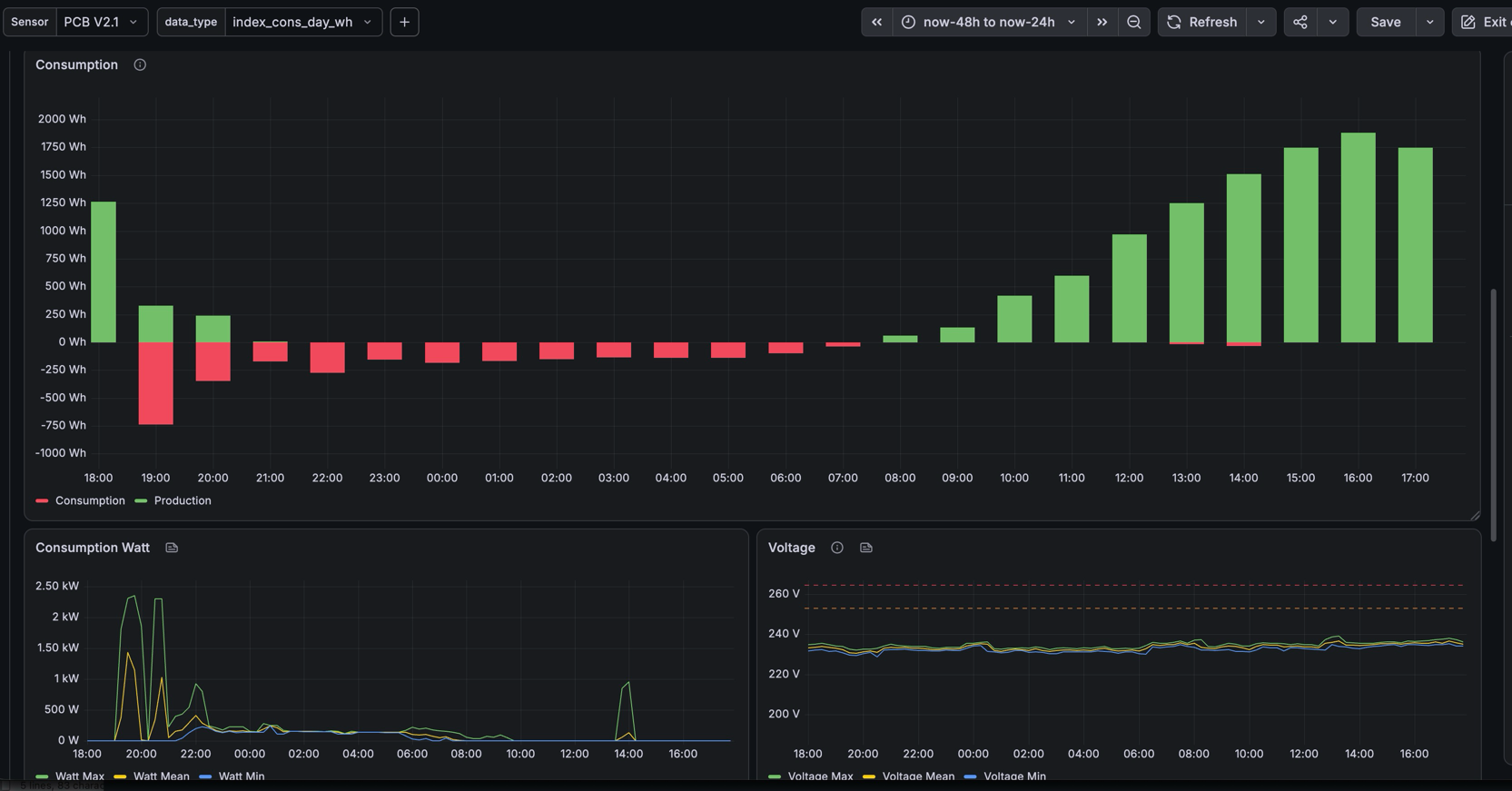
Electricity. Belgian smart meters expose a P1 port, an RJ11 socket that outputs a full report every second as ASCII text on a serial line: consumption and production indexes, voltage and current per phase. I connected it to a CubeCell Arduino-compatible board, which is powered by the meter itself. The firmware parses the telegrams, then transmits every 15 minutes, aligned on the same quarters as the utility company, with minimum, maximum and average voltage.
It also counts over-voltage events above 253 V, the threshold at which solar inverters must disconnect from the grid in Belgium, so I can quantify lost solar production. Full details in my P1 port article and the source code on GitHub.
Gas. The gas meter sits in a box outside the house, so the sensor must run on battery. The meter has a small magnet on the last digit wheel, one rotation per 10 liters of gas. A reed switch, a small glass tube that closes a contact when the magnet passes, is placed in front of it and connected to a 20 EUR Dragino LDS02 configured in pulse counting mode. It wakes up on each pulse, increments its counter and reports the index every hour.
Water. My water meter is read by an inductive sensor and firmware I wrote, which keeps a circular register of the consumption minute by minute. Each hourly message contains the current index followed by pairs of bytes: the number of minutes without consumption, then the low-order bits of the index when it changed. With this compression, one message reconstructs at least 50 minutes of per-minute history, and up to 50 hours when nothing flows. Per-minute resolution is what lets you distinguish a 6 liter toilet flush from a 40 liter washing machine cycle. I wrote about it in part 1 and part 2, and the code is on GitHub.
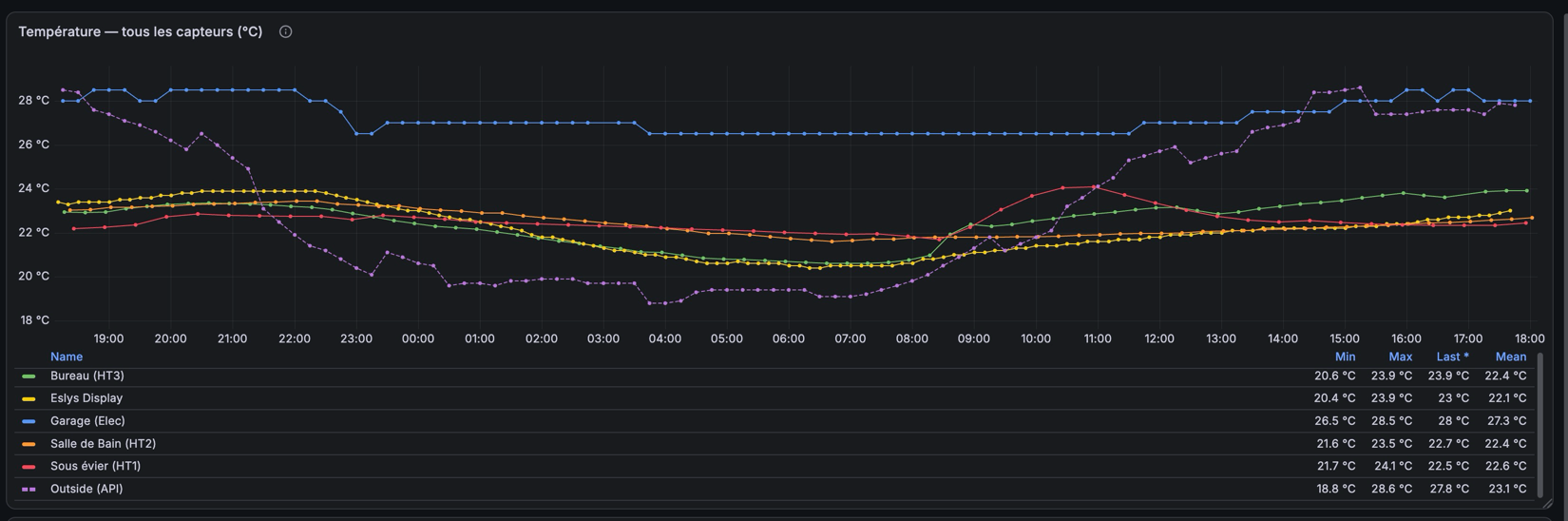
Environment and more. Multiple humidity and temperature sensors are deployed in my house. They help me check that ventilation is working correctly: an Elsys ERS CO2 Lite in my bedroom monitors CO2, since a high CO2 level reveals bad ventilation, and Dragino LHT52 sensors track humidity and temperature in the other rooms. Finally, a Dragino PS-LB pressure sensor measures the level of my rainwater tank, which helps me monitor the water level, detect a leak and alert me when the level is too high or too low. More on this in an upcoming article.
The AWS architecture
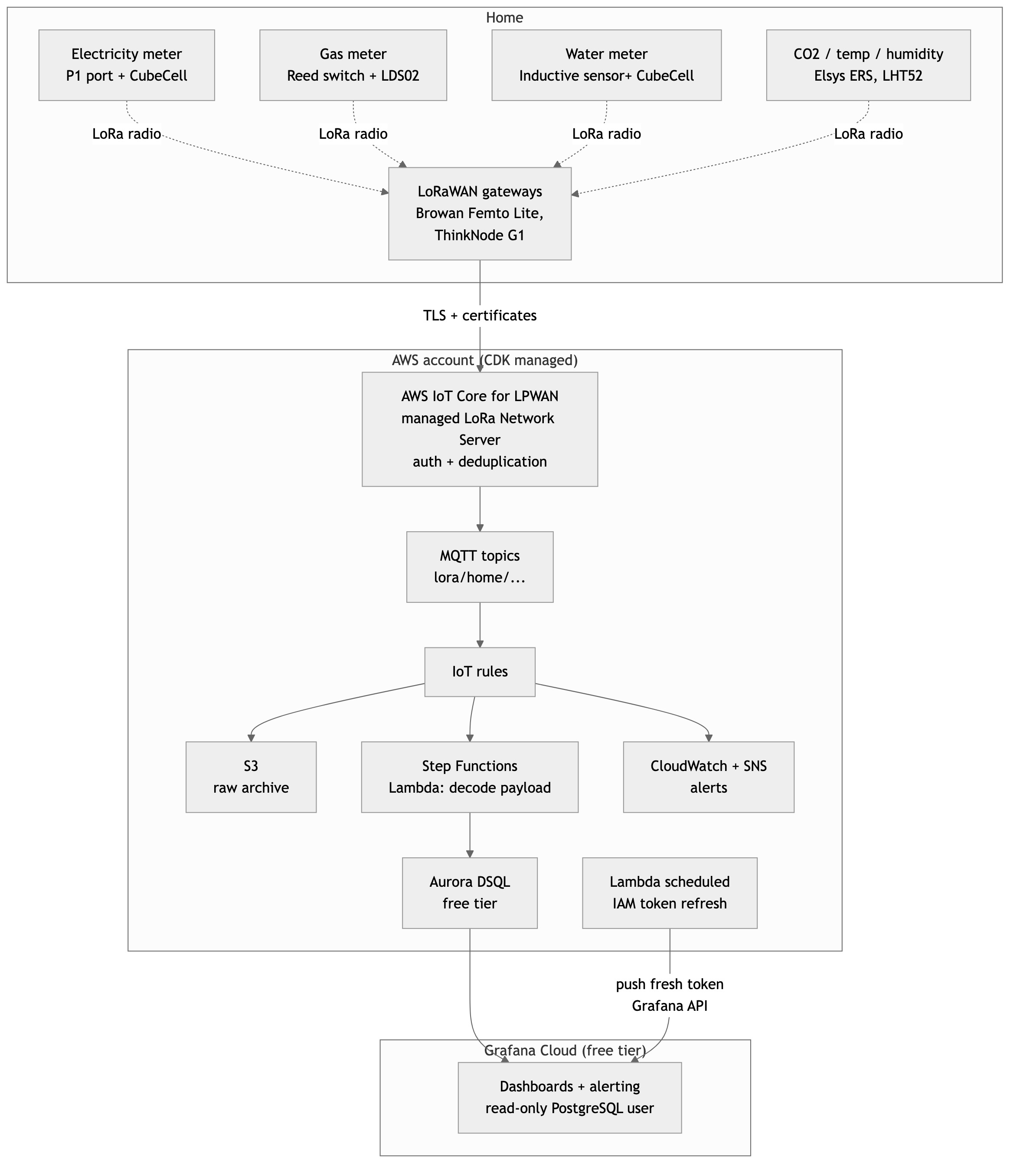
Every message flows through the same pipeline:
- Raw archive. An IoT rule subscribes to
lora/#and writes every incoming message to S3. If anything goes wrong downstream, no data is ever lost and I can replay it. - Decode and store. For each sensor model, another rule triggers a Step Functions workflow with two steps: a Lambda decodes the base64 payload into meaningful values, then the result is inserted into the database.
- Database: Aurora DSQL. A time series database like Timestream would be the textbook choice, but my target was a bill of zero. Aurora DSQL is a serverless, PostgreSQL-compatible, distributed database announced at re:Invent 2024. You pay for the processing units (DPUs) consumed by your queries and per gigabyte stored, with automatic replication across three availability zones. The free tier includes 100,000 DPUs and 1 GB of storage per month, which is a lot for an IoT project, and it fully covers my workload. A daily job aggregates raw indexes into hourly and daily consumption tables so dashboards scan fewer rows.
- Visualization: Grafana Cloud. The free tier of Grafana Cloud gives me dashboards and alerting. One twist: DSQL has no static passwords, authentication uses short-lived IAM tokens, while Grafana expects a permanent password. So a Lambda runs on a schedule, generates a fresh token and pushes it into the Grafana datasource through the Grafana API. The Grafana database user is read-only: if the token ever leaked, nobody could write to the database and inflate my bill. Full write-up in my Grafana and DSQL article.
- Alerting. Grafana evaluates rules every hour and sends me an email when a threshold is crossed, and CloudWatch with SNS notifications covers Lambda errors and sensor disconnection alerts.
Everything is defined with AWS CDK: gateways, devices, rules, Lambdas, the database. One hard-earned lesson: never let CloudFormation delete a LoRaWAN device. When a device is deleted from the LNS, the session keys negotiated at join time are lost, and the sensor keeps transmitting with keys the server no longer knows. Depending on the firmware, it can stay unreachable until someone physically presses its reset button, which is annoying when the sensor is glued inside a meter box in the street. My CDK code uses a custom resource whose delete operation is a no-op by default, with an explicit override when I really want to remove a device. Details in Managing LoRaWAN sensors with CDK.
What it costs me
The gateways and sensors are a one-time hardware investment. On the cloud side, IoT Core for LoRaWAN, Lambda, Step Functions, S3 and DSQL all sit comfortably in free tiers or cost cents at this scale, and Grafana Cloud is free. The recurring bill is essentially zero, which was the design goal.
What is next
The data opens interesting doors. Give a CSV of per-minute water consumption to a large language model and it already knows that a toilet flush is 6 liters and what a washing machine cycle looks like: it labels your consumption patterns without any training. My next step is a weekly Lambda that sends my consumption history to Amazon Bedrock and emails me a trend report through SES.
Also on the list: monitoring the heating system, and a small DIY alarm system for my house based on LoRaWAN door and glass breakage sensors like the LDS02 and finally a sensor to gather my inverted electrical production.
A word of caution to conclude: this data is more sensitive than it looks. Per-quarter-hour electricity indexes are enough to tell when a home is occupied, and per-minute water data reveals when you sleep. That is a good reason to keep the pipeline under your own control, encrypted end to end, in your own AWS account.
Resources
- AWS Podcast en français, episode 374: my interview about this project
- Les Technos: Domotique DIY en LoRaWAN
- Source code: P1 smart meter reader and LoRaWAN pulse counter
- Deep dives on this blog:
- Connect Browan Femto Lite to AWS IoT Core
- Connecting ThinkNode G1 LoRaWAN Gateway to AWS IoT Core
- Reading Belgian Smart Meters via P1 Port and Transmitting Data over LoRaWAN
- DIY Smart Water Meter with LoRaWAN, part 1, part 2 is upcoming.
- Managing LoRaWAN Sensors in AWS IoT Core with CDK
- Visualizing IoT Data from Aurora DSQL with Grafana Cloud Free Tier
Note on ABP frame counters
The 16-bit frame counter limitation described in the security section applies to LoRaWAN specifications up to 1.0.3. In the LoRaWAN L2 1.0.4 specification, the LoRa Alliance increased the frame counter to 4 bytes (32 bits) and made it mandatory to store it in persistent memory, so it can never be reset during the lifetime of the device, for both OTAA and ABP. This removes the 65,536 transmission limit and prevents replay attacks during the whole device life. See What’s new in LoRaWAN 1.0.4 for a summary of the changes.
Comments